

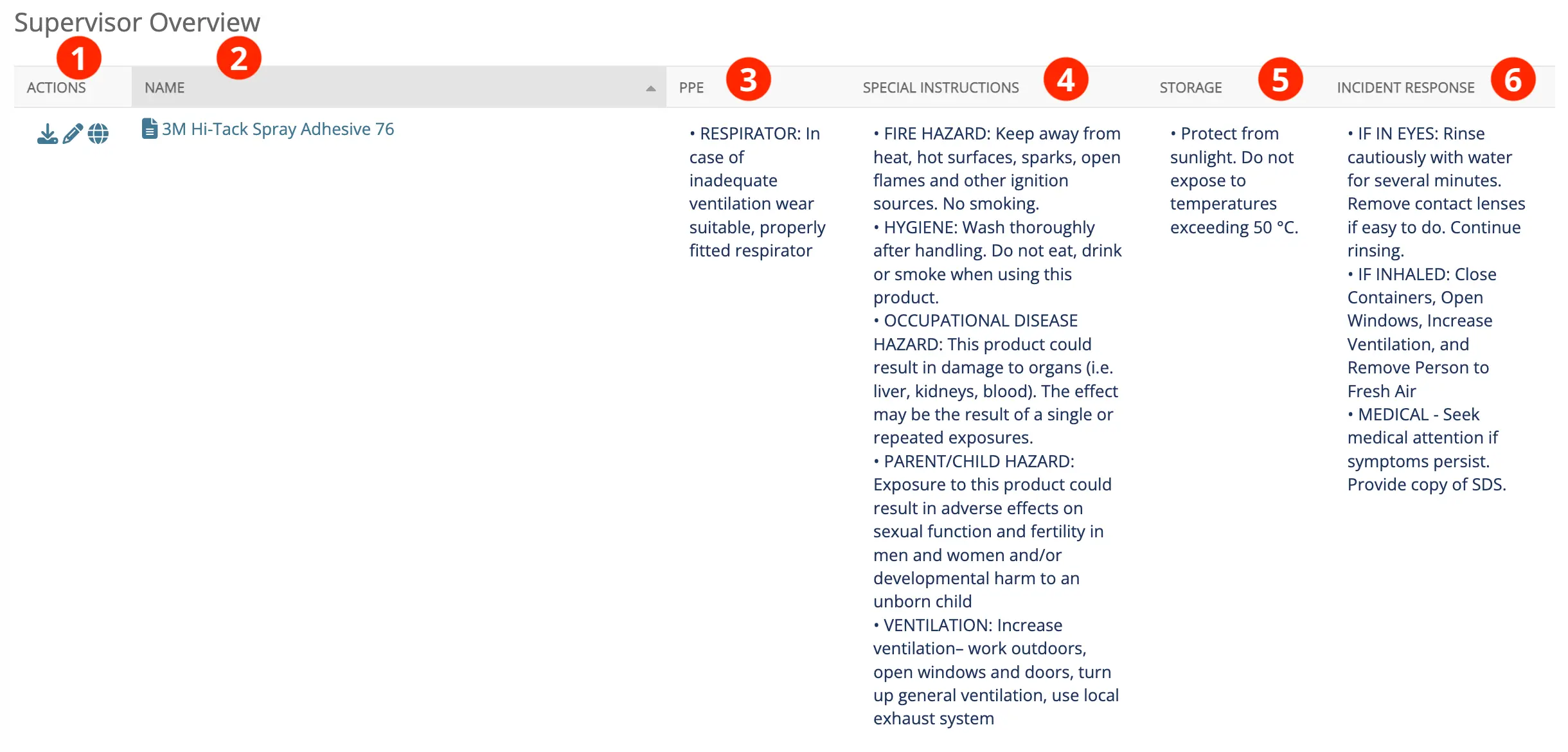
SDS RiskAssist's Supervisor Overview page is like a cheat sheet for supervisors. At the click of a mouse, a supervisor can see the safe-handling instructions for all the chemicals in their location.
- Actions: Click on this link to download the safety data sheet or edit the information associated with it or see where it is being used. Allows easy access to the full product information for cross-reference.
- Name: What you call the document. This is the same as the name of the PDF file. You can call the PDF anything up to 240 characters. If you click on the name the one-page summary will show up.
- PPE: Added by your organization to indicate what PPE should be used. Gives employees specific direction on the PPE required and available to use the product safely.
- Special Instructions: Added by your organization to provide additional information. Gives employees specific instructions on how their company expects them to handle the product.
- Storage: Added by your organization to indicate where or how the product is stored. Ensures consistent and safe storage of products.
- Incident Response: Added by your organization to indicate how to respond in the case of an exposure or spill of the product. Ensures employees have rapid access to information and can act quickly if an incident occurs.