
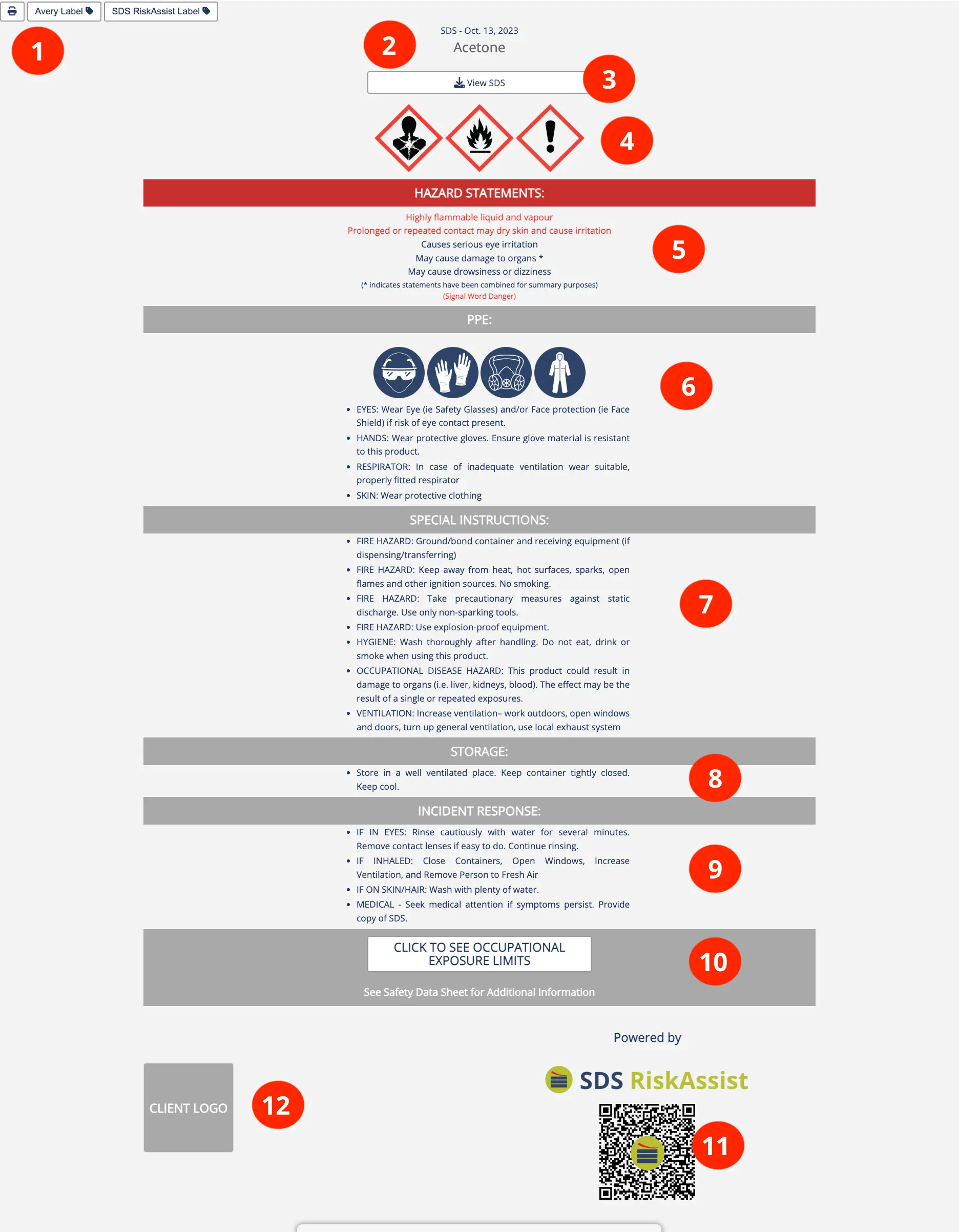
- Print SafetySnap™ or pre-formatted labels: Click this icon to create a hard copy of the SafetySnap™ on paper or in PDF format. You may also click to print the pre-formatted workplace labels for the product.
- Name: What you call the document. This is the same as the name of the PDF file or adjusted by you after upload. You can call the PDF anything up to 240 characters. If you click on the name the SafetySnap™ will show up.
- View SDS: Click on this link to download the safety data sheet or the document. Allows easy access to the full product information for cross-reference.
- Hazard Symbols: The WHMIS symbols associated with the hazards identified on the safety data sheet. Makes the hazards easily identifiable to users.
- Hazard Statements: The WHMIS standardized phrases about the hazards of the products you use. Wording in red indicates a hazard statement that is associated with the signal word Danger. Allows for universal recognition of the hazards and their severity, caused by the product.
- PPE: Indicate what PPE should be used. Gives employees specific direction on the PPE required and available to use the product safely. Defaults are provided and can be customized by the client.
- Special Instructions: Provides additional information. Gives employees specific instructions on how their company expects them to handle the product. Defaults are provided and can be customized by the client.
- Storage: Provides storage guidance for the product. Defaults are provided and can be customized by the client.
- Incident Response: Indicates how to respond in the case of an exposure or spill of the product. Ensures employees have rapid access to information and can act quickly if an incident occurs. Defaults are provided and can be customized by the client.
- Occupational Exposure Limits: Click to see a list of all ingredients in the product with regulatory exposure limits and their OELs. Allows users to identify potential regulatory concerns.
- QR-Code: Scan to gain quick access to the SafetySnap™ and the SDS.
- Logo: The summary will display your logo (if desired) to indicate that these instructions specifically apply to your organization.